
One of the most familiar Oracle Database initialization parameters for DBAs is the SESSIONS parameter. This setting limits the maximum number of concurrent sessions, effectively connections, allowed on an Oracle Database instance. The first time you reach this maximum is memorable: every new connection attempt is denied with an ORA-00018: maximum number of sessions exceeded error, and support channels rapidly light up with user reports.
What to Do When You Hit the Limit?
DBAs typically have two options: terminate existing sessions (risky unless you fully understand application behavior), or raise the SESSIONS parameter value. Since SESSIONS is a static parameter, increasing it requires a CDB (Container Database) restart, an action most DBAs want to avoid, especially when many PDBs (Pluggable Databases) are involved. Restarts disrupt services, require coordination, and often prompt questions from business stakeholders.
To minimize this risk, DBAs historically set SESSIONS to a high value “just in case.” While this reduces the chance of hitting the limit, it may mask the real session requirements of your database.
Why Does This Matter for Cloud Migration?
When planning a migration to Oracle Autonomous Database, session management takes on new significance. For example, Autonomous Database restricts session counts per ECPU: currently, a single ECPU allows up to 75 sessions for the TPURGENT, TP, and LOW service names. If you need 750 concurrent sessions, you’ll require 10 ECPUs, directly impacting cost. More at Database Service Names for Autonomous AI Database.
First Advice: Challenge Your Session Settings
The sessions parameter should not be used as a benchmark. Instead review your historical usage through AWR reports or monitoring tools. The real number of concurrent sessions is often much lower than the configured maximum, which may have been set conservatively or based on outdated needs. This is a crucial discussion point when estimating cloud sizing.
A Real-World Example
During a sizing estimation we had a look at the actual session consumption over time, not the SESSIONS parameter. We observed peaks of about 10,000 sessions connected simultaneously on the database.
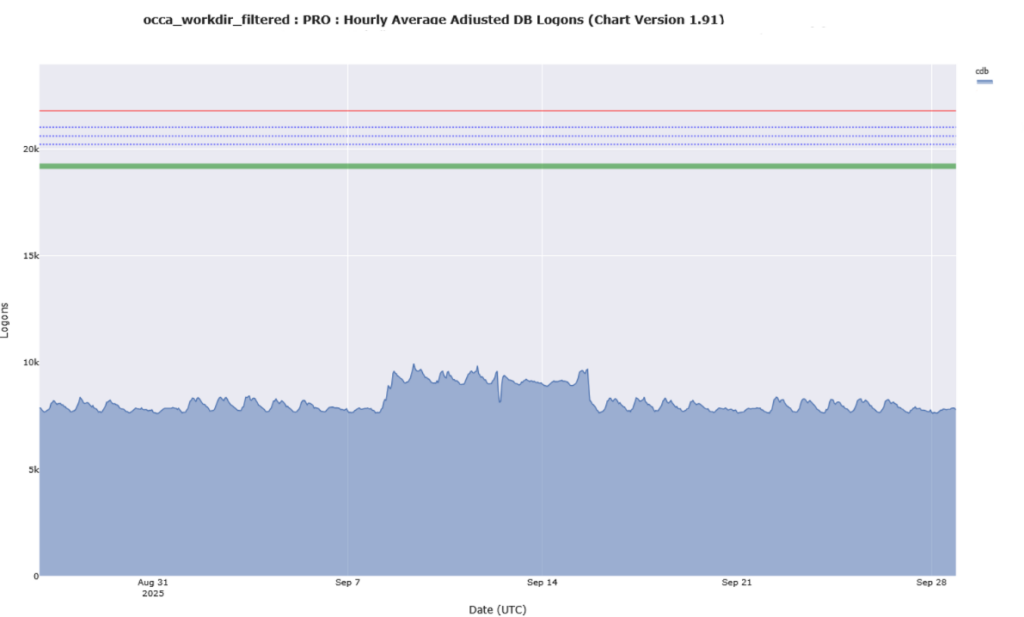
At 75 sessions per ECPU, this would mean 134 ECPUs, a potentially prohibitive expense. However, upon further analysis, active concurrent session count peaked at only 65, indicating that most connected sessions were idle. This suggests that lower session may be achievable, particularly by optimizing the connection pooling settings in the application server.
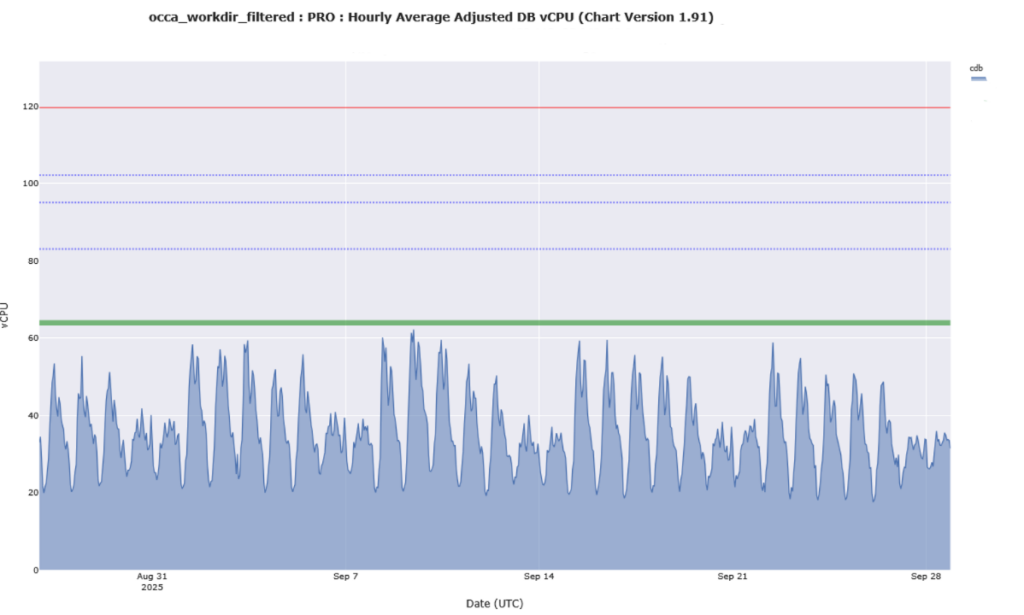
As usual the truth is in the middle. Maybe 10000 session is too much, but 75 is for sure too few. Starting for example with 2000 session pooled from the application server could be a good middle ground. In these cases we suggest tuning the application server’s connection pool in a proof of concept to determine if lower session counts are sufficient for performance.
Best Practices
- Analyze Actual Workload: Use AWR or similar tools to assess the number of average active sessions. And then decide if lower connection pooling can fit the requirements.
- Tune Connection Pools: Coordinate with application owners to reduce over provisioned pools. Talking with people is key. They know why parameters were set historically, and can give You valuable opinions on how to size and how to test.
- Consider Shared Server Configurations: In some environments, shared server mode can efficiently handle more users with fewer sessions. High Performance Features in Autonomous AI Database on Dedicated Exadata Infrastructure
If You Still Hit the Session Limit “Don’t Panic!”
Remember that Autonomous Database is flexible. You can scale ECPUs dynamically, instantly adding 75 more session slots per ECPU. This gives you breathing room to investigate unexpected surges, which are often caused by application misconfigurations or resource leaks.
In Summary:
Right sizing the SESSIONS parameter and understanding your true session requirements is critical for a cost-effective cloud migration. Take the opportunity to review past usage, tune your application tiers, and use Oracle Autonomous Database’s scaling features to respond when you really do need more sessions, rather than overprovisioning from the start. And remember:
“Cloud Is Not On-Premises: Transformation Is in Mindset and Configuration”