
Some time ago, right after the launch of DB@AWS, a customer asked me to compare the cost of a Exadata Half Rack on-premises with a Cloud deployment. As always, I asked for real usage data from the on-prem systems they planned to migrate. What they sent back gave me real food for thought about what flexibility in the cloud truly means for database infrastructure. We all know the “Black Friday” stories: extra compute needed to handle a short-term surge. But this conversation made me reflect on a more everyday pattern: how demand grows, stabilizes, and sometimes shrinks over years, and how that should change our sizing decisions. The data surprised me.
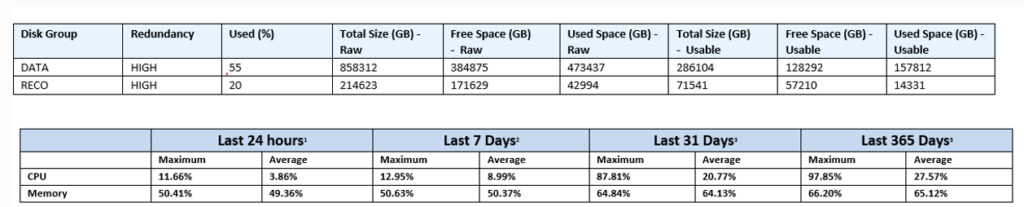
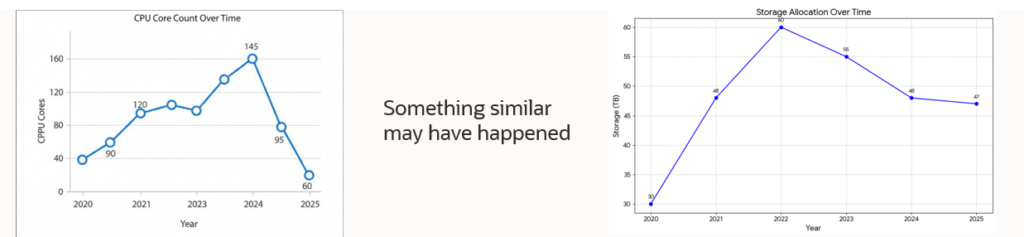
CPU and data volumes would easily fit into a Quarter Rack. So I asked: “Why do you want a Half Rack?” Their answer was familiar. In the past, they had bought a Half Rack, migrated workloads, reached a consolidated steady state, and later saw usage drop as applications were decommissioned or moved elsewhere. Sure, a Quarter Rack would work today, but they didn’t know what future demand would look like. Buying bigger up front simplified budgeting and avoided mid commitment procurement and delivery processes. This is the classic on-premises mindset: estimate the peak size for it and stay on the safe side. Expanding later creates work and cost. Depreciation schedules for staggered hardware purchases complicate long-term financials. If we visualize their past five years on-prem, it likely looked like this:
– CPU: low during early migration, rising steadily to a normal plateau, then dropping as big applications were decommissioned.
– Storage: a gentler curve, with some reductions over time but less volatility than CPU.
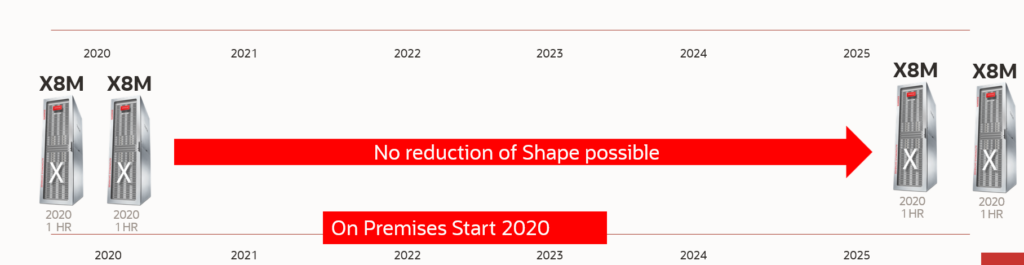
-Hardware: they started with multiple Quarter Racks and ended with the same hardware footprint five years later, despite lower utilization. No practical way to remove unused capacity without extra effort and cost.
But cloud is different. If this customer had onboarded to cloud back in 2020, the journey could have played out very differently. Start small, flex up, then flex down.
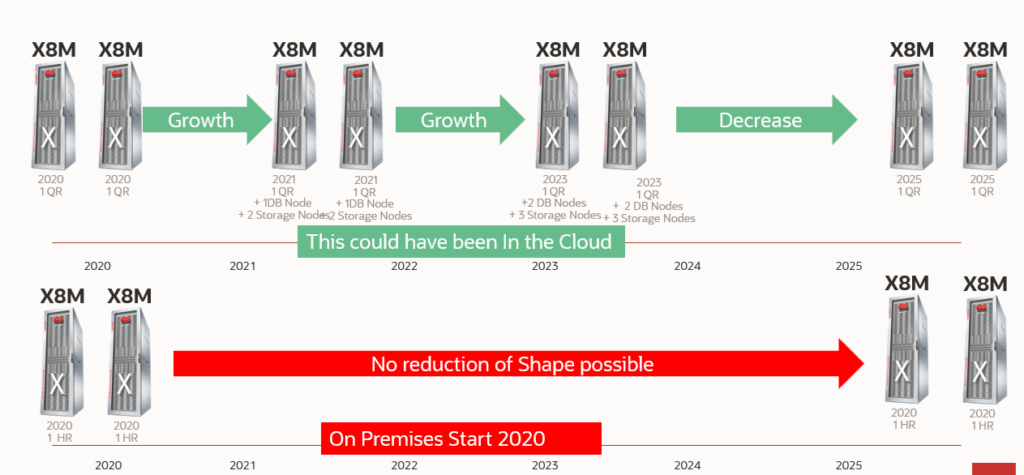
– Begin with a Quarter Rack configuration (2 DB nodes, 3 storage cells) and scale on demand.
-Add capacity as migrations progress, one DB node and one storage cell at a time, until you reach the equivalent of a HalfRack.
– When usage drops, scale down and stop paying for what you no longer need.
That alone delivers savings twice: less cost up front, and lower cost when demand recedes. Then there’s tech refresh. On-prem, you often wait for the depreciation cycle to complete before moving to a new generation. In the cloud, you’re not tied to CAPEX, you can adopt newer generations as they arrive. Newer Exadata families typically deliver more CPU and storage at comparable price points, which means you can hold the same workload with fewer nodes.
A plausible five-year cloud path
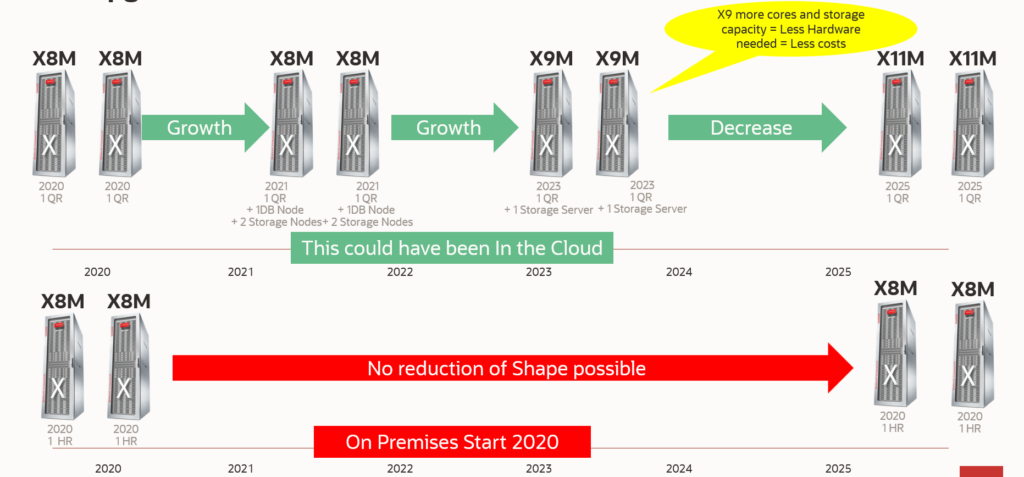
– Year 0: Start on a Quarter Rack. Right size from day one.
– Year 1–2: Scale up to reach Half Rack as migrations complete.
– Year 3: Usage drops after decommissioning major apps. Scale down one step.
– Year 3–4: Tech refresh to a newer Exadata generation. With higher density and performance, consolidate further (e.g., reduce by a couple of DB nodes and storage cells while meeting SLAs).
– Year 5: Another refresh brings you back to a Quarter Rack footprint, now with more headroom than when you started.
Outcome: a steadily declining cost curve, fewer idle cores over time, no procurement delays, and faster alignment between actual demand and deployed capacity.
Practical takeaways
– Collect real utilization: CPU, memory, I/O, storage, and concurrency. Separate “normal” from “peak.”
– Plan scale steps: Define clear thresholds to add or remove one DB node and one storage cell.
– Set downgrade triggers: Don’t just plan for growth; plan for contraction after app retirements or migrations.
– Budget for OPEX, not CAPEX: Model run-rate by month and include expected tech-refresh gains.
– Schedule refresh windows: Treat generational upgrades as a standard practice to harvest density and efficiency.
– Keep an eye on SLAs: Ensure scale-down and refresh decisions preserve performance, availability, and maintenance windows.
In summary:
Leave the old on-premises way of thinking and start reasoning about the opportunities cloud offers you. “Cloud Is Not On-Premises: Transformation Is in Mindset and Configuration”