A couple of days ago, I received a phone call from a former colleague of mine, who now works for an Oracle partner.
He asked me two very simple questions:
“What is the difference between OCPUs and ECPU in OCI?”
and
“Do ECPUs apply only to Autonomous Database, or also to Exadata Cloud@Customer databases?”
I prepared a written answer for him and, while doing so, I realized that this would also be a good topic for a blog article.
As usual, after preparing my first draft, I asked ChatGPT to answer the same questions. I often use AI tools to validate the structure of an article, challenge my assumptions, and sometimes find additional sources worth quoting.
This time, however, I was surprised.
The answer I received contained a lot of misleading and partially wrong information, especially around the relationship between OCPUs and ECPUs. After some additional checks, I found the likely reason: there is misleading information on the web that tries to define direct conversion factors between OCPUs and ECPUs. I will not quote those sources here, but if you search for this topic, you will probably find some of them.
That was the moment when I decided this article was really needed.
So let’s go back to the official Oracle documentation and clarify the topic from there.
ECPU and OCPU Are Billing Metrics
The first important point is this:
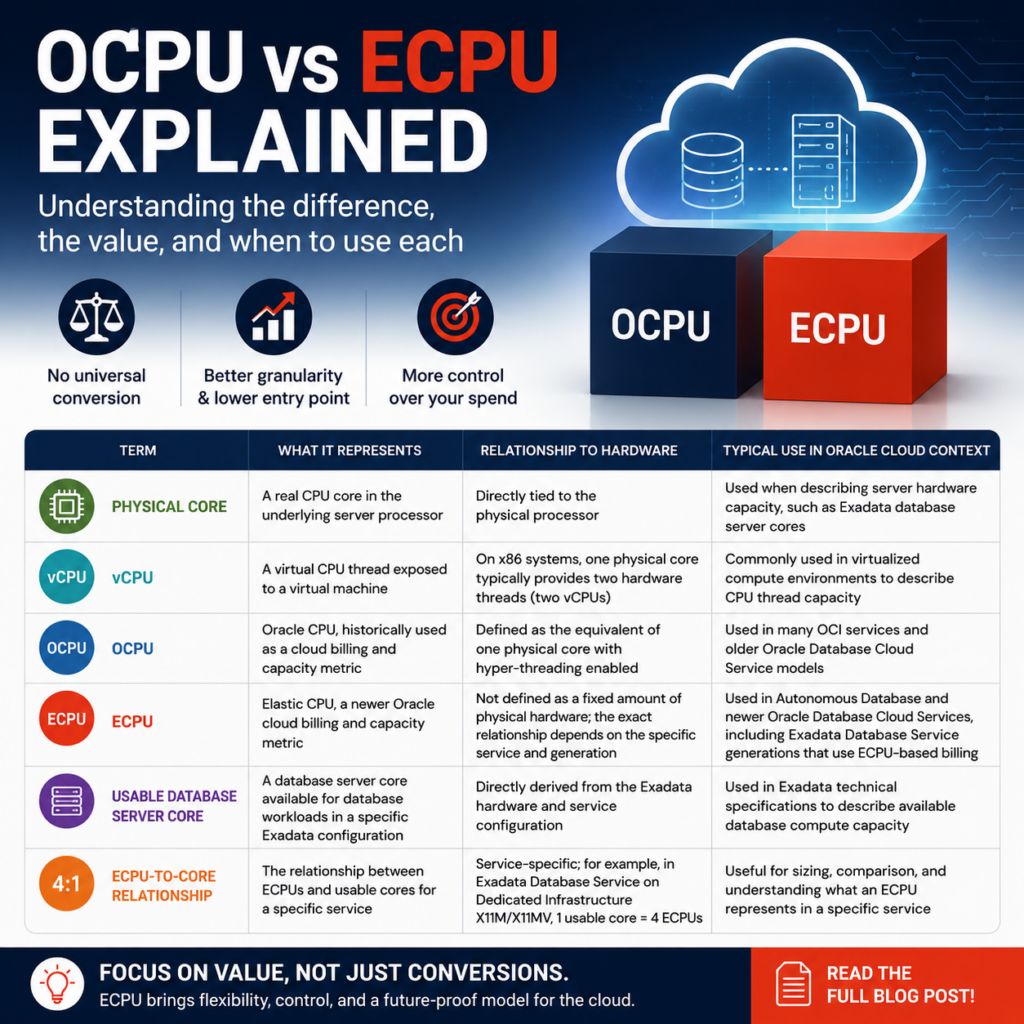
Both OCPU and ECPU are primarily cloud billing and capacity metrics.
Oracle’s Autonomous Database ECPU FAQ gives a very clear answer to the question:
“What is the difference between ECPUs and OCPUs?”:
“An OCPU is defined as the equivalent of one physical core with hyper-threading enabled. In contrast, an ECPU is not explicitly defined in terms of an amount of physical hardware. By introducing ECPUs Oracle is providing a durable pricing metric which is not tied to the exact make, model, or clock speed of the underlying processor.”
This is the key difference.
- An OCPU is defined in relation to physical hardware: one physical processor core with hyper-threading enabled.
- An ECPU, on the other hand, is not defined as a fixed amount of physical hardware. It is a more abstract cloud billing metric, designed to remain stable even when the underlying processor generation changes.
So, in simple terms:
OCPU is closer to the physical server architecture.
ECPU is closer to an elastic cloud consumption model.
Is There a Simple Conversion Between OCPU and ECPU?
Many customers ask this question because they are familiar with the OCPU metric and simply want to translate it into the newer ECPU model. So they search for an answer to:
“How many ECPUs are equal to one OCPU?”
And this is exactly where a lot of misleading information starts.
The short answer is:
No, there is no universal technical conversion between OCPU and ECPU.
As explained above, the two metrics are defined differently. Therefore, a generic statement such as “1 OCPU equals X ECPUs” is misleading.
But this is not even the right question.
What we really want to know is:
“When I size a database service, how many ECPUs do I need to cover my workload?”
That is the practical sizing question. The number of ECPUs assigned to a database service, VM cluster, or autonomous database directly matters for both consumption and performance.
To answer that question correctly, we need to look at the official Oracle documentation for the specific service we are evaluating.
What Does an ECPU Represent in a Specific OCI Service?
To understand what an ECPU provides in practice, it is useful to look at the technical specifications of the specific cloud service being evaluated.
For example, in the Oracle Exadata Database Service on Dedicated Infrastructure X11M and X11MV technical sheet, the capacity table shows that one usable database server core corresponds to four ECPUs.
This means that, for this specific service and generation, the ECPU-to-core relationship can be derived directly from the published hardware and service specifications.

In the end, the value of an ECPU depends on the technical characteristics of the service where it is used. Understanding this relationship is an important starting point for sizing, comparing, and evaluating the right OCI database cloud service.
Looking Only for a Conversion Makes You Miss the Benefits
If we focus only on finding a conversion between OCPU and ECPU, we miss the more interesting part of the story.
ECPU was not introduced just to rename OCPU. It brings several practical advantages.
Better Granularity
With the ECPU model, Autonomous AI Database can be provisioned and scaled more granularly.
Oracle documents ECPU as the replacement billing metric for Autonomous AI Database, and Autonomous Database documentation shows the ECPU model as the current model for new and existing deployments.
This finer granularity is one of the practical advantages customers notice quickly. Instead of thinking in larger compute blocks, customers can size more precisely and align capacity more closely with the real workload.
For example if we look at Compute Models in Autonomous AI Database we find the following table that shows how the entry point is today with ECPUs compared to the past OCPUs
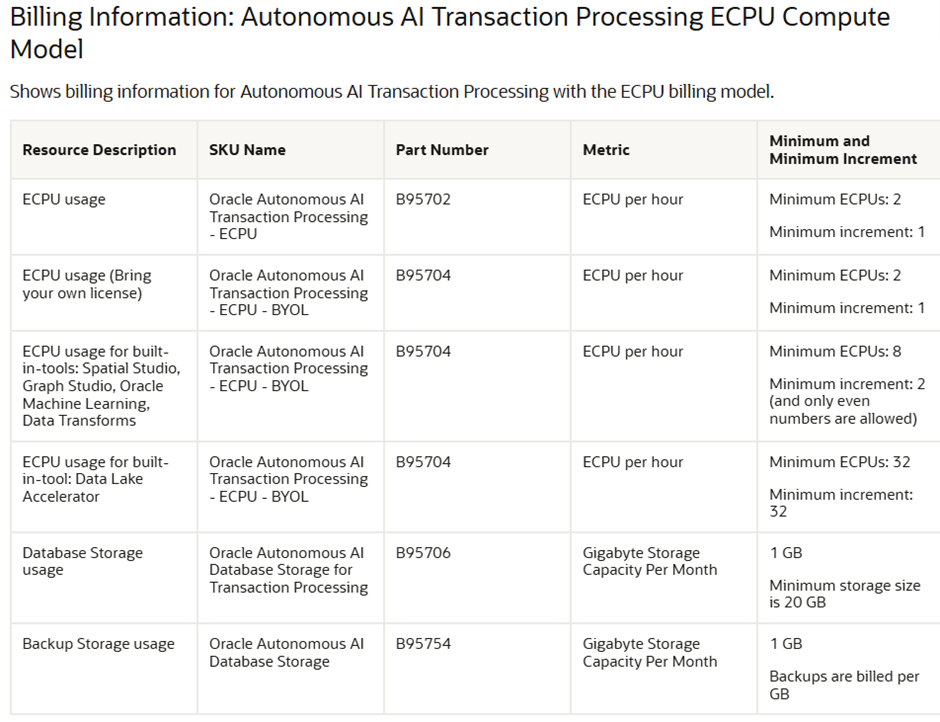
In the same document, the legacy OCPU table lists 1 OCPU as the increment allowed for Autonomous AI Transaction Processing
Lower Entry Point
Better granularity also means a lower entry point.
For small workloads, development environments, test systems, or databases that grow gradually over time, this can be very useful. Customers can start with a smaller compute footprint instead of overprovisioning from the beginning.
The same compute model tables also show the different entry points between the ECPU and legacy OCPU models.
This does not mean that ECPU is automatically “more powerful” or always “cheaper” than OCPU. The advantage is more subtle and more practical:
Smaller increments can reduce overprovisioning.
And less overprovisioning often means better cost control.
Better Price Control
When compute can be adjusted in smaller steps, customers have more control over cloud spend.
Instead of scaling in large jumps, they can increase or decrease capacity more precisely. This is especially important for workloads with changing usage patterns, such as development databases, seasonal workloads, or applications that are still growing.
Oracle also describes ECPU as the recommended billing model for Autonomous AI Database, while OCPU is described as the legacy billing model. For details, see the Compute Models in Autonomous AI Database documentation.
Do ECPUs Apply Only to Autonomous Database?
This was the second question from my former colleague.
The answer is:
No, ECPUs do not apply only to Autonomous Database.
Autonomous Database is probably where many people first noticed the move from OCPU to ECPU, but ECPU is also used for other Oracle Database Cloud Services.
For example, the Oracle PaaS and IaaS Universal Credits Service Descriptions include Oracle Exadata Cloud@Customer Database ECPU – BYOL, SKU B110663.
Oracle documentation for Exadata Database Service on Cloud@Customer also discusses CPU scaling and explains that ECPU replaced the previously used OCPU metric starting with the X11M generation for Oracle Database services on Exadata Database Service on Cloud@Customer.
So the answer is clear:
ECPUs apply to Autonomous Database, but not only to Autonomous Database.
They also apply to Exadata Cloud@Customer and other Oracle Database Cloud Services, depending on the service generation and SKU.
Summary
OCPU and ECPU are both Oracle Cloud billing and capacity metrics, but they are based on different concepts.
An OCPU is defined as the equivalent of one physical processor core with hyper-threading enabled.
An ECPU is not defined as a fixed amount of physical hardware. It is a more abstract and durable pricing metric, designed for elastic cloud consumption and less dependent on the underlying processor generation.
Therefore, I would avoid generic conversion statements such as:
1 OCPU equals X ECPUs.
Those statements may look helpful, but unless they come directly from the official documentation for a specific service and SKU, they can easily be misleading.
For customers, the practical guidance is simple:
Always check the official Oracle documentation for the exact cloud service, generation, and licensing model you are discussing.
And if you are planning a cloud database deployment, do not look only for a conversion factor. Look also at the advantages of the ECPU model: better granularity, lower entry point, improved price control, and a more future-proof metric.