
Some time ago, I wrote about a customer whose database used very little CPU but had a 64 GB SGA allocated on premises. The question was whether memory would become a cloud migration showstopper. We challenged the existing configuration with the SGA Advisor and planned to validate a smaller allocation. You can find that story in my earlier article, Is Memory a Cloud Migration Showstopper?
Recently, I encountered another database consuming approximately 4 vCPUs, with 80 GB of allocated memory. Once again, memory became the central question in the sizing discussion.
This time, I would like to look at Oracle Exadata Database Service on Exascale Infrastructure, or ExaDB-XS. For a database that really needs more memory than CPU, the distinction between enabled and reserved ECPUs gives us an interesting option.
What ExaDB XS brings to the discussion
ExaDB-XS runs databases in VM clusters on shared infrastructure managed by Oracle. Exascale is the underlying architecture that pools compute and storage resources. Instead of starting with a dedicated Exadata system, we provision a VM cluster and a storage vault, then scale the resources we need. Oracle’s overview ExaDB-XS Overview and datasheet ExaDB-XS Datasheet explain the service in more detail.
There is a difference between database versions. Oracle Database 19c uses Exascale block storage through Exascale Direct Volumes, with ASM managing DATA, RECO and LOG disk groups. Oracle AI Database 26ai uses Exascale smart storage directly through the vault, removing ASM from that database storage path. The two architectures cannot be mixed in one VM cluster ExaDB-XS Overview
For the memory discussion, however, the principle is the same. We can use the enabled and reserved ECPU model with 19c as well as 26ai. A customer does not need to wait for a database upgrade to benefit from it.
The number that matters for memory
Let us start with the allocation rule: ExaDB-XS provides 2.75 GB of VM memory per total ECPU. Oracle documents this in the capacity limits Capacity Limits for ExaDB-XS and provisioning guide Provision ExaDB-XS. This ratio is fixed; memory is calculated from the total ECPU allocation.
The flexibility comes from having two ECPU counts. Enabled ECPUs provide active compute capacity and determine database licensing. Additional reserved ECPUs are allocated to the VM for later activation. Both contribute to the total ECPU count used to calculate memory.
For example, eight enabled ECPUs with no additional reservation provide 22 GB of memory per VM. Keep those eight enabled, reserve four more, and the VM receives 33 GB. The database still has eight enabled ECPUs.
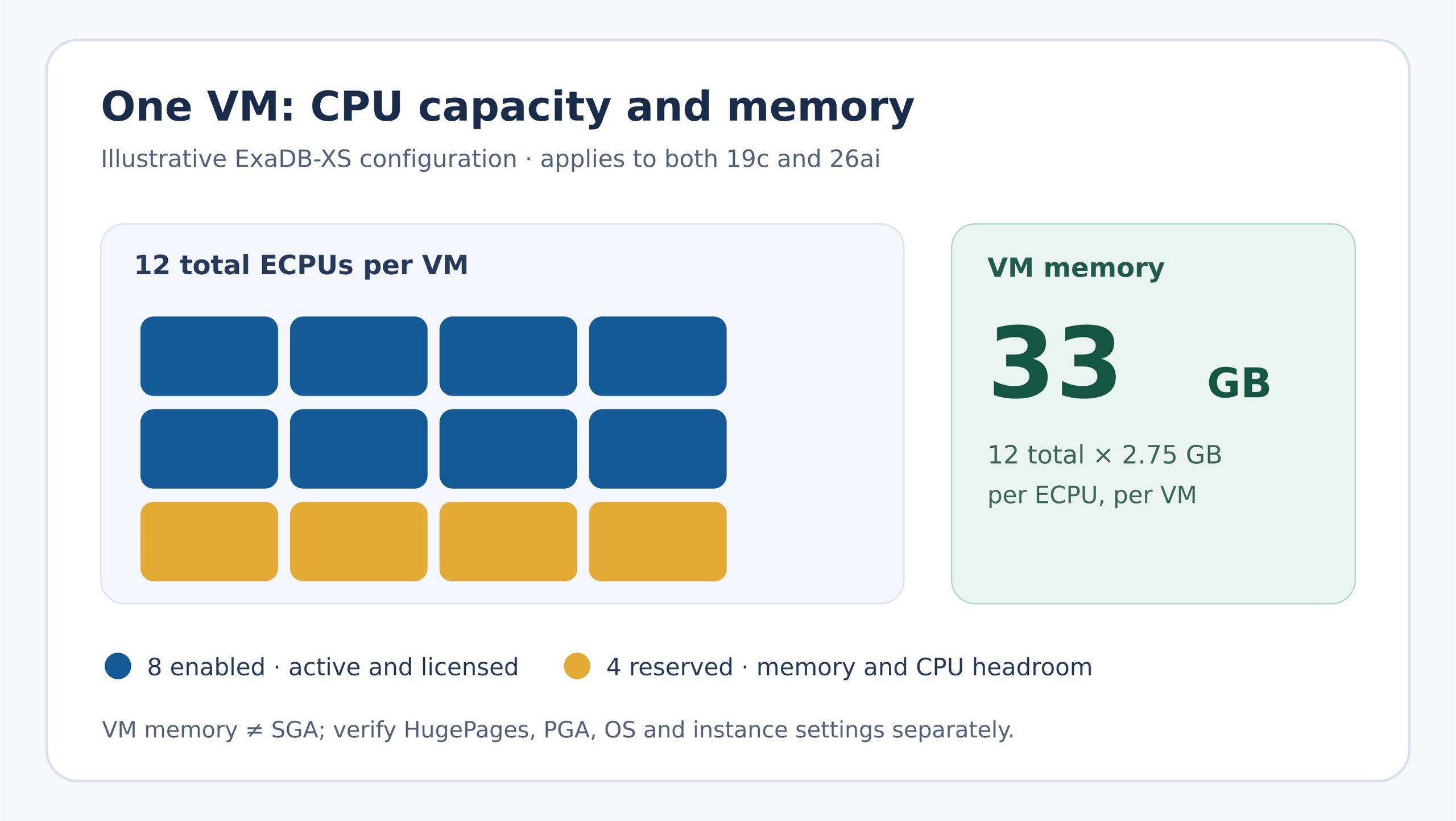
Figure 1. Allocation per VM, inspired by Oracle’s core reservation illustration. Each square represents one ECPU. Memory follows all 12 ECPUs; database licensing follows the eight enabled ECPUs. The 33 GB is total VM memory, before SGA, PGA and operating system requirements.
| Enabled ECPUs per VM | Additional reserved | Total ECPUs per VM | VM memory |
| 8 | 0 | 8 | 22 GB |
| 8 | 4 | 12 | 33 GB |
| 8 | 40 | 48 | 132 GB |
These examples show why the model is useful. Compared with a service configuration where memory follows active CPU directly, we can increase VM memory without enabling the same number of ECPUs for the database. We can also enable existing reserved ECPUs without restarting the VM. Expanding the reservation itself requires a rolling restart.
There is still a cost. Infrastructure billing follows total ECPUs, including reserved capacity; the database usage component follows enabled ECPUs. Oracle makes this distinction explicit even when enabled ECPUs are scaled to zero Scale ECPU to Zero. So reserving capacity for memory avoids additional enabled database ECPU charges, while increasing the infrastructure allocation we pay for.
VM memory is only the starting point for SGA sizing
Back to the original customer question: how much of this memory can become SGA?
The SGA uses HugePages, while PGA, the operating system and other processes also need memory. Oracle’s ExaDB-XS guide states that databases are created with USE_LARGE_PAGES=ONLY. If enough HugePages are not available, the instance will fail to start ExaDB-XS Service. The pool must accommodate the SGAs of all instances on each VM, with suitable headroom. You can find a useful explanation in this blog post: Huge Pages: In the context of Exadata | exadata
Oracle’s Exadata Dedicated guide explicitly permits manual HugePages changes, although it does not recommend them: Manage VM Clusters. For Exadata Dedicated, the documented initial HugePages allocation is 50% of VM memory. After resizing memory, automation attempts to preserve the configured percentage, capped at 60%; higher percentages are reduced to 60%. A precheck verifies that the running databases will still fit in the resulting pool. If not, the resize is blocked. This documents the 60% configuration and its safeguards for Dedicated. For ExaDB-XS, verify the applicable service behavior and actual pool on every node; combined SGAs must fit while leaving enough conventional memory for PGA and the OS.
The database creation defaults also matter. The XS guide documents an initial SGA_TARGET of 3,800 MB on smaller VMs and 7,600 MB on VMs above 60 GB ExaDB-XS Service. Adding VM memory does not automatically give an existing database a larger SGA. Database settings and the HugePages pool must be sized together.
The practical lesson is simple: 33 GB of VM memory does not mean a 33 GB SGA. And in a two node RAC cluster, adding the memory of both nodes does not create one larger SGA. Each instance must fit on its own VM.
Flash cache gives us another option to test
Exascale also makes it interesting to look beyond database server memory. A storage vault includes default Smart Flash Cache, and we can purchase additional cache as a percentage of provisioned vault storage. The extra flash also includes additional storage-side memory cache Manage Exascale Database Vaults. This can improve some workloads without increasing the vault’s disk capacity.
Smart Flash Cache is automatic on Exadata Dedicated too. Exadata chooses frequently accessed and valuable data to cache; we do not normally decide manually which blocks should stay in flash Exadata Smart Flash Cache. With Exascale, resource allocation across vaults is derived automatically from their provisioning settings Inter-Vault Resource Management Using Exadata IORM. For ExaDB-XS, the useful difference is that additional cache is exposed as a vault-level service option, without us adding or managing individual storage servers.
Flash cache remains separate from SGA. It can make a cache miss less expensive, but it cannot replace shared-pool memory or turn storage-side cache into VM RAM. The right balance depends on the workload and needs testing.
One 19c detail is worth keeping in mind: vault storage can be scaled online manually, but storage auto scaling is not available for 19c. DATA and RECO allocations must also be adjusted at the individual database level.
Challenge the allocation before paying for it
ExaDB-XS gives us more flexibility when a database has a real memory requirement and modest CPU demand. We can obtain memory based on total ECPUs and enable only the compute needed for the workload. We can use this approach with 19c today.
But my first recommendation has not changed since the earlier article. Ask why the current SGA is that large. Use AWR and the SGA Advisor, test a smaller allocation, and measure application response times and throughput. Then evaluate whether more VM memory or additional flash cache solves a demonstrated need.
Memory still has a cost. ExaDB-XS gives us a useful way to manage that cost, but the best saving starts by challenging the allocation at the beginning.