
With the latest DB@Azure announcement, more customers are considering migrating their legacy databases to the cloud, taking advantage of running Oracle Database on their preferred hyperscaler. In my conversations with customers, I consistently see growing interest in Oracle Autonomous Database as a top choice.
The discussion often starts with features like manageability, scalability and security but quickly shifts to sizing and costs. Since Autonomous Database is billed based on CPU consumption, our first recommendation is to estimate required resources by analysing historical performance data from the existing on-premises environment.
As Oracle engineers, we’re fortunate: the Automatic Workload Repository (AWR) captures comprehensive performance data, from CPU usage to memory access and network activity, over at least a month, providing a solid foundation for cost and capacity planning.
A Real Example: Minimal CPU, Maximum Memory?
Recently, we worked through this sizing exercise with a customer. The data revealed peak usage of less than 1 vCPU over the past month.
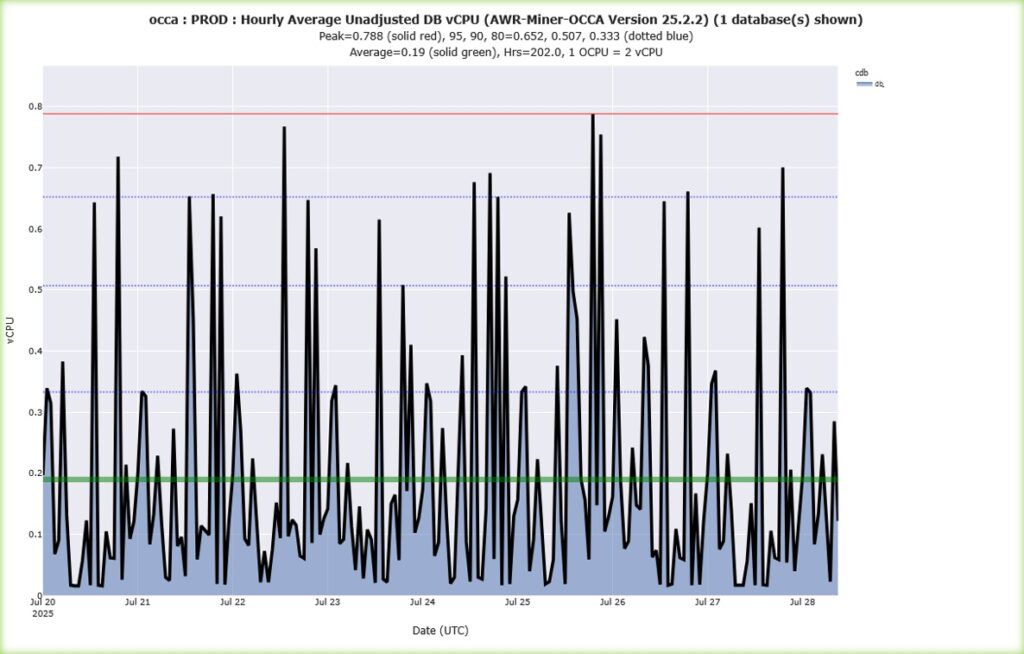
The database was primarily used for bulk data loads and as a data source for web applications, an ideal candidate for low-cost cloud migration.
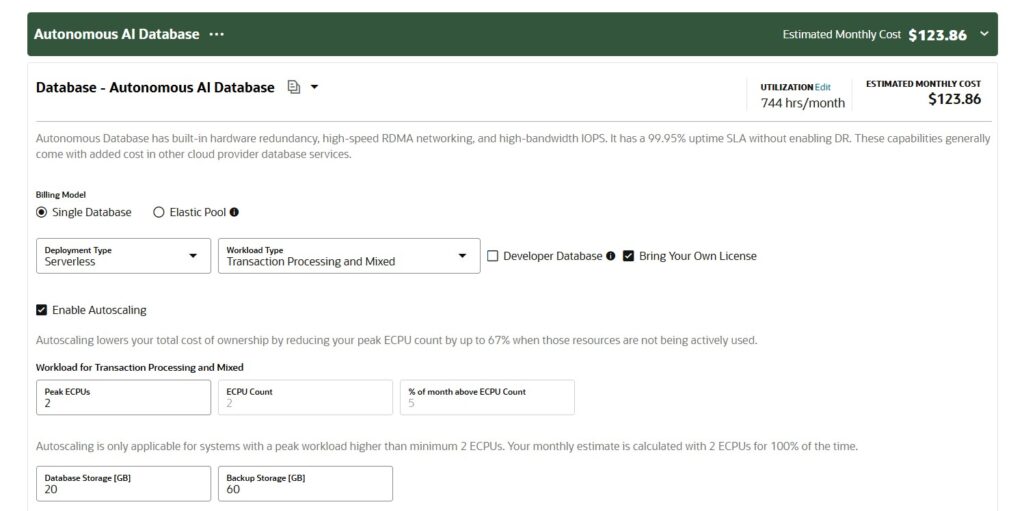
Plugging 2 eCPUs into the OCI cost calculator https://www.oracle.com/cloud/costestimator.html estimated a monthly cost of just $123 with BYOL (Bring Your Own License)—or around $503 with the included license. Very affordable.
But what about memory?
Currently for an Autonomous Database (ATP transaction processing typy) roughly 2GB of SGA memory per ECPU are allocated. If you need more memory, you must provision more ECPUs. In this customer’s case, the on-premises database had 64GB of SGA allocated, meaning 32 ECPUs (and a $2,000 BYOL $8,000 License Included monthly cost) would be needed in the cloud to match that configuration. This seemed like a blocker.
Is Memory the Showstopper? Not Necessarily.
As I mentioned in a previous article https://field42.ch/you-dont-need-a-starship-sometimes-a-towel-is-enough/, on-prem is not cloud. Many on-premises best practices don’t translate directly to cloud environments.
When we asked why so much memory was allocated, the answer was simple: historical reasons and available server capacity. Over time, as applications came and went, the database retained a large memory allocation just because the server had plenty available. In a shared physical environment, “use what you have” makes sense. But in the cloud, every extra GB increases cost.
I advised the customer to use Oracle Enterprise Manager’s SGA Advisor for right-sizing. The analysis showed that even reducing memory to 16GB would only slightly affect performance, with a more noticeable impact below that threshold.
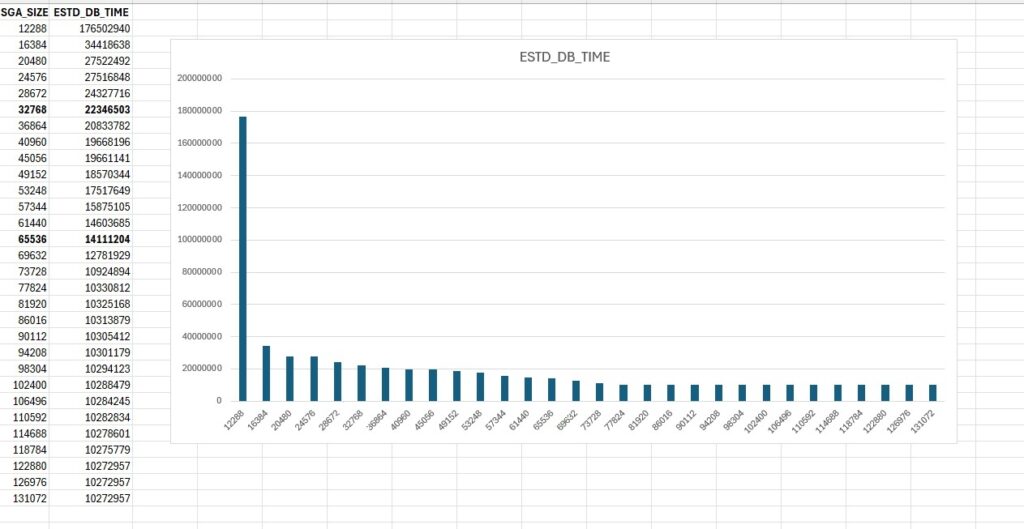
Even if the SGA Advisor shows that the SGA should be actually larger my advice is always to test the workload because the application KPIs may still be met, given also the Exadata capabilities Autonomous Database relies on
The Takeaway: Test and Challenge Old Assumptions
My recommendation: Don’t migrate legacy configuration assumptions to the cloud. A proof of concept can validate that much lower memory settings (for example, 8GB instead of 64GB) will likely suffice, greatly reducing ongoing costs. That’s the approach this customer is taking, testing a right sized configuration before fully migrating.
In Summary:
Cloud is not on-premises. If you want to be cost-efficient, it’s essential to revisit assumptions, challenge inherited configurations, and validate new sizing for the cloud.