A step-by-step guide to finding the answer by yourself
Recently, a procurement officer from a customer I’m working with reached out to me with a question:
“Is the Exadata Management Pack included in the License Included option?”
The customer is using several Exadata Cloud@Customer (ExaCC) systems. As you may know, there are two ways to license the databases running on your VM clusters:
- Bring Your Own License (BYOL): you run the databases using licenses you already own.
- License Included: you don’t need to already own database licenses, because the licenses are included in the service price.
(See: BYOL to PaaS FAQ | Oracle)
Why the question comes up
The customer asked because there had been internal discussions, and some colleagues were convinced that with the License Included option, all Oracle Enterprise Manager (OEM) packs are included, and that the Exadata Management Pack is therefore included as well, allowing them to use it at no additional cost. The Exadata Management Pack was released in August 2024, and you can find more information here: Introducing Exadata Management and Zero Data Loss Recovery Appliance Management Packs | observability
In this article, I’ll show how you can investigate questions like this yourself and find the most reliable answer using Oracle’s official documentation.
Step 1: Start with Oracle’s contracts and policies documentation
My first stop for questions like this is always Oracle’s official documentation page:
Transparency in our Contracts and Policies | Oracle.
The key is less about memorizing rules and more about knowing where to find the current, authoritative source documents.
If You navigate to Cloud Services Contracts | Oracle You will find documentation describing Oracle’s cloud offerings, not only for OCI, but also Oracle services offered through AWS, Azure, and GCP (in alphabetical order).
Because the customer is running Exadata Cloud@Customer, we’ll use the example document: Oracle PaaS and IaaS Universal Credits Service Descriptions
To navigate that document efficiently, it helps to understand one key concept: the SKU. A SKU (Stock Keeping Unit) is Oracle’s internal identifier for a specific cloud service offering and pricing line item.
In the Oracle PaaS and IaaS Universal Credits Service Descriptions, services are defined and described by SKU. So the practical question becomes: Which SKU corresponds to the Exadata Cloud@Customer “License Included” service my customer is using? Once you have the right SKU, you can jump directly to the relevant service description and review what is included.
Step 2: Find the SKU in the Oracle Cloud Cost Estimator
One simple way to find the SKU You are searching for is to use the Oracle Cloud Cost Estimator: Estimate Cloud Costs Easily | Oracle .
As the the customer is using Exadata Cloud@Customer, I filter on the category Oracle Databases and open the Exadata Database – Cloud@Customer page. There you can enter the number of OCPUs/ECPUs for either the BYOL service or the License Included option.
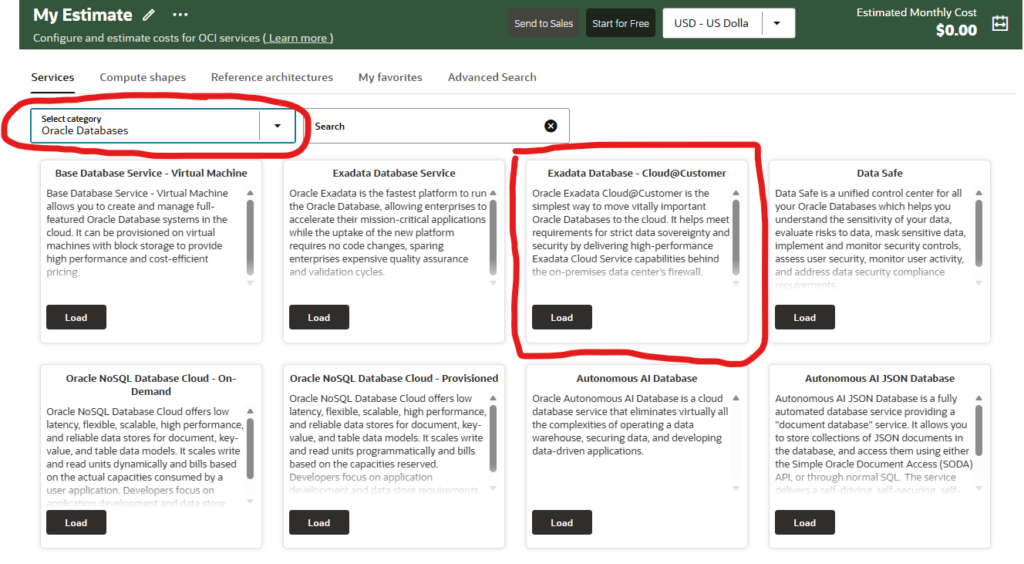
There you can enter the number of OCPUs/ECPUs for either the BYOL service or the License Included option, for Example I put an 8 in the ECPU field at the bottom. Please do not use the BYOL fields as they are for the Bring Your Own License SKU.
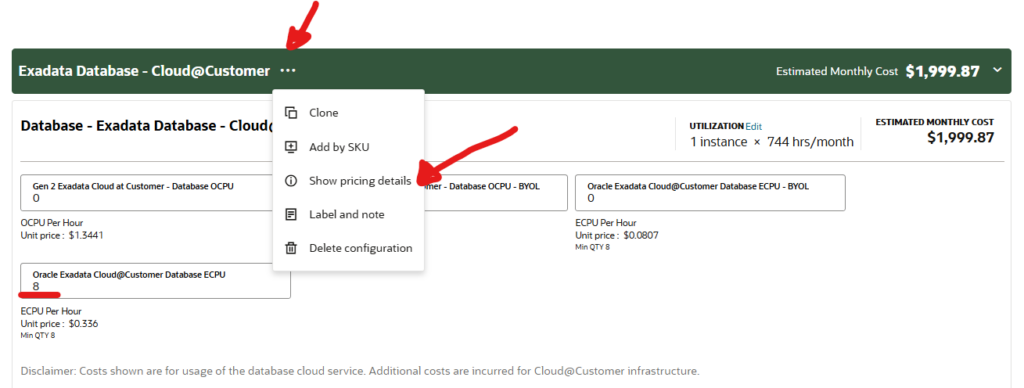
After this if You open the menu (three dots) as shown in the picture and choose Show pricing details You will find the SKU You are looking for: B110631
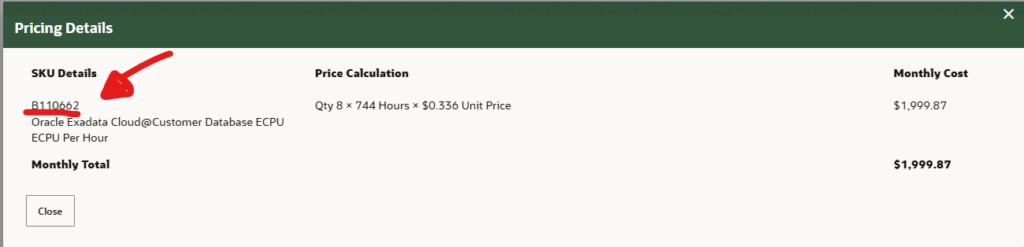
Step 3: Use the SKU in the Universal Credits Service Descriptions
Now that we have the SKU, we can open the Oracle PaaS and IaaS Universal Credits Service Descriptions, where the different SKUs are defined.
This document is hundreds of pages long and describes each service and the conditions for its use. To keep it simple, search the PDF for the SKU code and jump directly to the relevant section.
(In my case, it landed around page 103, but don’t rely on page numbers, since this is a living document and the layout changes over time. The version I used had an effective date of 31-March-2026.)
In the service description you will find references to several notes (for example, notes 6, 8, 9, and 16). The most relevant one here is Note 6, which states:
6: This Cloud Service includes the entitlement for In-Memory Database, Real Application Clusters, Active Data Guard, Multitenant, Partitioning, Real Application Testing, Advanced Compression, Advanced Security, Label Security, Database Vault, OLAP, Advanced Analytics, Spatial and Graph, Diagnostics Pack, Tuning Pack, Database Lifecycle Management Pack, Data Masking and Subsetting Pack, and Cloud Management Pack for Oracle Database.
This note lists exactly which database options and which Oracle Enterprise Manager packs are included in the service, and Exadata Management Pack is not listed.
Because Exadata Management Pack is not listed in Note 6, this is a strong indication that it is not included in the License Included option and would need to be licensed separately for use with ExaCC.
Step 4: Double-check in OEM licensing documentation
To double check I reviewed the Oracle Enterprise Manager Cloud Control Licensing Information User Manual, 13c Release 5.
This document describes the different OEM packs from a licensing perspective. In Chapter 2, “Database and Engineering System Management,” there is a section dedicated to the Exadata Management Pack. There, you can see that the Oracle Diagnostics Pack is a prerequisite for Exadata Management Pack, but it is not included within it.
| Management Pack | Type of Licensing Information | Licensing Information |
|---|---|---|
| Exadata Management Pack | Prerequisites | The Exadata Management Pack requires the Oracle Diagnostics Pack. |
Step 5: Validate via the Oracle Technology Global Price List
This is also reflected in the Oracle Technology Global Price List (which you can also access from Transparency in our Contracts and Policies | Oracle.). There, the Exadata Management Pack is listed separately with its own pricing, which further supports the conclusion that it is not automatically included as part of other packs unless explicitly stated
Final Note
This post is intended as a step-by-step guide to help you find the relevant Oracle source documents and validate what is (and isn’t) included in a given cloud service.
For a definitive answer for your specific contract and environment, follow Oracle’s standard guidance:
“If you have a question about your license rights and obligations, please contact your Oracle sales representative.”
My goal is that, after reading this post, you’ll be better prepared for that discussion and can point to the exact sections of the official documentation.
In this case, after we validated the findings with the appropriate internal teams, the conclusion was that the Exadata Management Pack is not included in the License Included option for Exadata Cloud@Customer. However, customers can still use it via BYOL, provided they have the required licenses and entitlements in place.